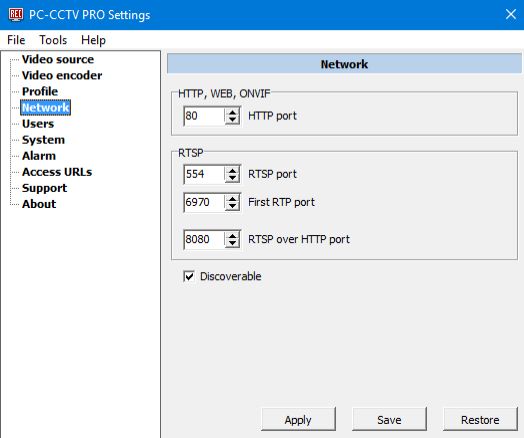
HTTP port: To set HTTP port. The port is used for:
RTSP port: Port RTSP (using the port the videoplayer receives all the parameters of the RTP streams from the program).
First RTP port: First RTP port.
RTSP- The protocol uses not only RTSP port, but also 2 more RTP ports for each viewer.The 2 ports needed for streaming video and audio.
The first viewer receives streams through ports : First RTP port + 0 and First RTP port + 1.
The next viewer receives receives streams through ports RTP port + 2 and First RTP port + 3.
And so on
RTSP over HTTP port: Technological port, is needed for the programm operation
Discoverable: Turn on WS-Discovery. When the option is turn on, DVR can find the PC with running program using WS-Discovery algorithm. Otherwise you will have to enter the address of the computer by hand.
If your computer is running behind the Firewall, you will have to forward following ports :
a) If a DVR receive HTTP stream (RTP over RTSP over HTTP over TCP or JPEG over HTTP) - will need to forward only HTTP port.
b) If a DVR receive RTSP stream - HTTP port (for ONVIF), RTSP port, N*2*RTP port, where N is the number of the viewers.
PC-CCTV program will work only if all the 4 ports are not used by other programs/applications. You can see what can be done if a port is used by another program here: Message "Error. Port XXX is occupied by another application"